

WedTexts vs. Text My Wedding

Compare WedTexts reminders with a wedding inbox and RSVPs

WedTexts already offers scheduled reminders, immediate broadcasts and unlimited groups. Compare its guest-count pricing with Text My Wedding’s outgoing-message plans, then decide whether private replies, household RSVPs and guest media collection justify a move.

2,500,000+ messages sent
Wedding DigestBudget Savvy BrideThe KnotAxios

Compare the workflows

Checked October 25, 2026. Competitor details come from the official sources linked below. Plan limits and features can change.

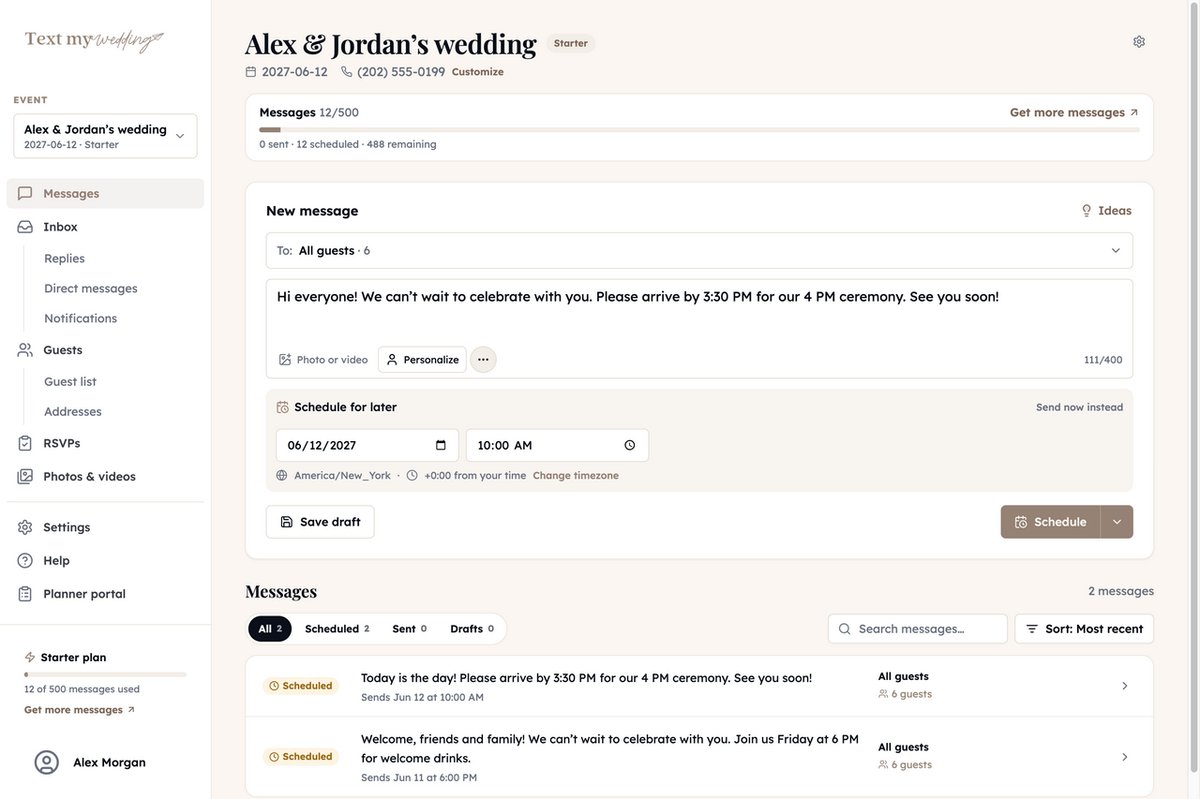
Schedule and edit remindersText My WeddingSchedule ahead, edit scheduled messages and send last-minute updates from the web app.WedTextsUnlimited pre-scheduled reminders, editable before sending, and unlimited real-time messages; web and mobile apps.
Groups and shared managementText My WeddingImport a spreadsheet, organize groups and households, and invite collaborators to your wedding.WedTextsUnlimited groups; two user accounts on the free plan and three on paid packages.
Replies and RSVPsText My WeddingRSVP forms save household responses to the guest list. Private incoming text replies require Plus or higher.WedTextsThe reviewed pricing and feature pages emphasize outbound reminders. Two-way reply handling and a built-in RSVP form were not established; ask WedTexts if those are essential.
Photos and videoText My WeddingPhoto upload link and QR code on Starter and above; video uploads and incoming texted photos on Plus and above.WedTextsA guest photo/video collection workflow was not confirmed on the reviewed pages. Do not assume it is included with reminder packages.
Guest and send limitsText My WeddingPlans limit outgoing texts rather than charging per guest. Every recipient delivery uses one message; replies you send back also count.WedTexts15 guests free; 50 guests $75; 100 guests $140; 150 guests $195; unlimited guests $300. Packages advertise unlimited messages and no monthly fee.

Pricing for a real wedding plan

Illustrative scenarios, not quotes. Prices checked October 25, 2026; Text My Wedding amounts are USD, before any applicable tax.

100 guests, five reminders

100 distinct mobile recipients × 5 broadcasts = 500 outgoing messages for one wedding. Excludes additional one-to-one answers.

Text My Wedding: Starter is $57 for 500 messages. If you want incoming text replies, choose Plus at $87 for 1,200 messages instead.

WedTexts: $140 for up to 100 guests with unlimited real-time messages and pre-scheduled reminders. Sending only five times does not lower its listed package price.
100 guests, forty updates

100 mobile recipients × 40 sends = 4,000 outgoing texts. This deliberately high-volume example shows where unlimited sends matter.

Text My Wedding: Premium is $137 for 2,500 messages. Adding 3 packs of 500 at $30 each covers 4,000 for $227 in total. Includes replies and photo/video uploads.

WedTexts: The same $140 guest package covers its advertised unlimited reminders. For frequent outbound-only updates, its pricing can be lower than a larger message allowance.

WedTexts prices are the dollar amounts on its official pricing page; confirm billing currency, taxes and current package terms before purchase. Text My Wedding incoming replies do not consume the allowance, but outgoing direct replies do. Scheduled sends reserve allowance when queued.

Check Text My Wedding plans and limits

When WedTexts suits you

Keep WedTexts if you mainly need outbound reminders, send very frequently, or have a wedding party of 15 or fewer who fit its advertised free package. Its unlimited-send model may be more useful than paying for an outgoing-message allowance.

When Text My Wedding suits you

Text My Wedding suits couples who want a private reply inbox on Plus, structured household RSVPs, and original-quality photo/video collection with their guest list. Count each recipient for every planned send before choosing a tier, especially if you plan frequent updates.

Rebuild your WedTexts schedule safely

  1. List every future WedTexts reminder with its audience, date, time and venue details. Keep a copy of your current guest groups; do not assume schedules or groups will transfer between apps.
  2. Use your source guest spreadsheet, or an export if your account offers one, to fill Text My Wedding’s CSV template. Add US or Canadian mobile numbers and recreate groups such as rehearsal dinner, wedding party and shuttle riders.
  3. Import, review the guest preview and rebuild scheduled messages in the wedding timezone. Add household RSVP forms if needed, then total all recipient deliveries and leave room for outgoing direct answers.
  4. Send a test to yourself and a collaborator. Disable the corresponding WedTexts reminders before activating the replacement schedule, and introduce the new event number to guests who agreed to receive updates.

What Our Couples Say

Rachel J.

Jan 27, 2026

This service was a lifesaver for me and our guests loved it! We had transportation for our guests an...

Julia S.

Oct 22, 2025

We used Text My Wedding for our June 2025 wedding with over 100 out of town guests. It was super eas...

Dani S.

Mar 19, 2025

I used this service this weekend for my wedding. It was super easy to set up, no hidden fees, custom...

Carol J.

Jul 3, 2024

Did not think we would use the app until our wedding day but 3 weeks prior to our day the venue chan...

Sawyer G.

Jul 3, 2024

SO helpful! Our wedding was multiple days in different places and text my wedding was so so amazing....

See Text My Wedding In Action:

WedTexts comparison: common questions

Sources and verification

Official competitor pages reviewed October 25, 2026. Unconfirmed capabilities are labeled, rather than treated as missing. Text My Wedding features were checked against our current plans and help documentation.

Ready to dive in?Remove wedding day stress.

Send and schedule messages to your guests. Collect photos and RSVPs. All in one place.

Sign up now
Schedule a wedding message with a date, time, and event timezone