Wedding text messaging
Text every wedding guest at once, without the group chat
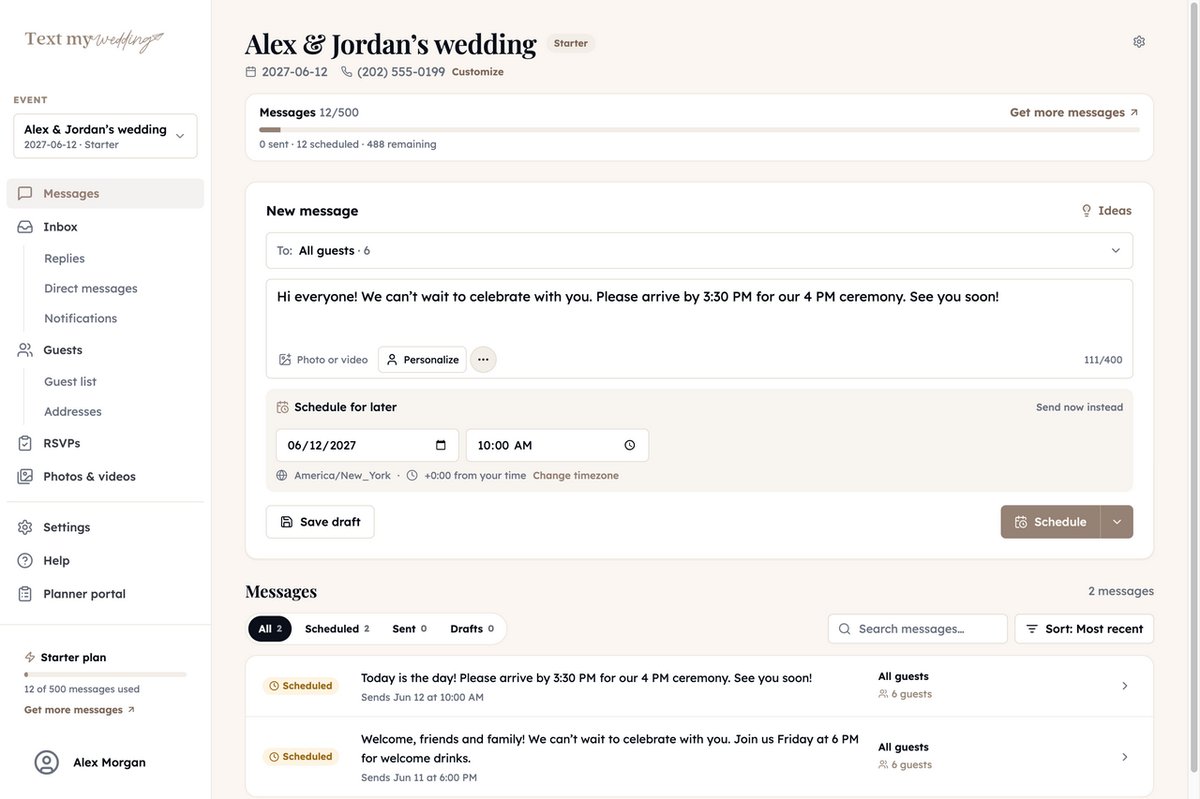
Import your guest list, write one message, and send it now or schedule it for later. Each guest gets a private text from your wedding’s number. On Plus and up, every reply comes back to one inbox.
- No app for guests
- Replies come only to you
- Schedule texts ahead
 Hi Sam! Welcome drinks start at 7 on the rooftop at the Harbor Hotel. Shuttles leave the lobby every 20 minutes:
How it works
From a spreadsheet of names to the last shuttle reminder, in four steps.
Step 1
Bring the guest list you already have
Upload the spreadsheet from your wedding website or your own tracker. Columns are matched for you, and anything extra, like table numbers, comes along so you can use it in a text.
- CSV, Excel, or a Google Sheet downloaded as CSV
- Households and plus ones, so a couple counts as a couple
- Groups like family, wedding party, or out-of-town guests
- Bad numbers and duplicates are set aside before you send
- Or share a signup link and QR code so guests add their own number
Coming from Zola, The Knot, or WithJoy? See the import guides.
Step 2
Write it once, personalized for everyone
Pick one group or several, then write the way you'd text a friend. Personalize adds each guest's name, household, or table, and you can page through exactly what each guest will get before it sends.
- Attach a photo, or a video guests open with one tap
- Drop in a map link, an RSVP link, or an address form
- Start from message ideas for save the dates, logistics, and thank yous
- Save a draft, or send a test to just you first
Step 2
Schedule the weekend, then put your phone away
Write the welcome, the shuttle times, and the day-of reminder in advance. Each one goes out on its own at the time you set, in your wedding's time zone even if you're planning from somewhere else.
- Edit, reschedule, or cancel anything before it sends
- Send different texts to different groups at different times
- See every scheduled, sent, and draft message in one list
Step 3
A normal text, sent to one person at a time
Guests don't download anything or join anything. Your message shows up in their regular texts, addressed to them, and stays easy to find on the wedding day.
- Each guest gets their own text, so replies come only to you
- Sent from a local phone number guests can save and text back
- Before your first text, guests get a one-time note saying it's from your wedding, with how to reply STOP
- Links are shortened to a tidy tmwed.us link, and photos arrive as picture messages
Step 4
Every reply in one inboxPlus and up
Guests answer your text like any other, and each reply shows up in one feed alongside the texts you sent. You see who asked, answer them directly, and nobody else gets pinged.
- Reply to one guest without texting everyone
- Get an email when a new reply comes in
- Photos guests text back go straight into your wedding album
Step 4
Know who got it, and fix who didn't
Every message shows who it was delivered to, who tapped its link, and who it didn't reach. When you fix a typo'd number or add late guests to a group, one button catches them up.
- Delivered, tapped link, and undelivered for each guest
- Temporary carrier hiccups are retried for you
- Send to more reaches only failed guests and guests newly added to the message's groups
- Guests who reply STOP are skipped from then on
Texts that get things done
A text can carry more than an update. Add any of these from the composer.
RSVP links
Each household gets its own link and answers for everyone in it. Your headcount updates as they do.
RSVP remindersAddress forms
Text a link that collects mailing addresses, then export them for your invitations.
Address collectionPhoto upload page
Send your upload link the morning after and guests add photos straight from their camera roll.
Photo sharingAttachment pages
Put the weekend schedule, a PDF, and your registry links on one page and text a single link.
Map links
Search an address while you write and drop a Google Maps link into the text.
Videos
Attach a video and guests get a link that plays it in their browser.
The texts most couples send
One guest list covers the whole engagement. Here’s a typical run, with wording you can start from.
6 to 8 months out
Save the date
Save the date! We're getting married June 12 in Charleston. A formal invitation will follow.
6 to 8 weeks out
Invitation with RSVP
Hi Sam! Our invitation is here, and you can RSVP for your whole household at your link:tmwed.us/aj4kd
A week before RSVPs are due
RSVP reminder
Friendly reminder that RSVPs are due Saturday. It takes about ten seconds:tmwed.us/aj4kd
Wedding week
Weekend details
Welcome to the weekend! Here's the schedule, the shuttle times, and where to park:tmwed.us/aj4kd
The day of
Day-of reminder
Today's the day! Please arrive by 3:30 for our 4 PM ceremony. See you soon!
The morning after
Thank you and photos
Thank you for celebrating with us! Add your photos and videos here:tmwed.us/aj4kd
Want dates for your own wedding? The guest text planner builds the schedule from your wedding date.
Share the work with your partner or planner
Invite anyone helping with your wedding by email. They can write, schedule, and send to your guests, and their access covers only your wedding.
What Our Couples Say
Rachel J.
This service was a lifesaver for me and our guests loved it! We had transportation for our guests an...
Julia S.
We used Text My Wedding for our June 2025 wedding with over 100 out of town guests. It was super eas...
Dani S.
I used this service this weekend for my wedding. It was super easy to set up, no hidden fees, custom...
Carol J.
Did not think we would use the app until our wedding day but 3 weeks prior to our day the venue chan...
Sawyer G.
SO helpful! Our wedding was multiple days in different places and text my wedding was so so amazing....
Pay once per wedding
Pick a plan by how many texts you expect to send. One text to one guest uses one message, and upgrading later only costs the difference.
| Plan | Price | Texts | Guest replies |
|---|---|---|---|
| Lite | $19 | 50 | – |
| Starter | $57 | 500 | – |
| Plus | $87 | 1,200 | |
| Premium | $137 | 2,500 | |
| Ultra | $237 | 5,000 |
Every plan includes groups, scheduling, personalization, and delivery status. Try it free first by texting your own phone.
Questions couples ask
Do guests need an app or an account?
No. Guests get regular text messages on the phone they already have. Links in your texts open in their browser.
Will guests see each other's numbers or replies?
No. Every guest gets their own one-to-one text, so there is no group thread and no reply-all. When a guest replies, only you see it.
What number do the texts come from?
Your wedding is given a local US phone number, and every text you send comes from it, so guests can save it and reply. On Starter and above you can switch to a different area code.
Can guests text me back?
On Plus ($87) and above, replies land in your inbox alongside the messages you sent, and you can answer any guest from there. Photos guests text back go into your wedding album too.
Can I schedule texts ahead of time?
Yes. Pick a date and time in your wedding's time zone and the text goes out on its own. You can edit, reschedule, or cancel it any time before it sends.
How long does a big send take?
Texts go out at a steady pace of about 40 guests a minute, so a message to 200 guests finishes in about five minutes. Delivery status fills in as it goes.
Can I text international guests?
Texts go to US and Canadian (+1) mobile numbers, including those guests' phones while they travel abroad. Other country codes are flagged when you import, so you know who to reach another way.
How long can a text be?
Up to 400 characters. For a full weekend schedule or a packing list, put it on an attachment page and send the link.
Can my partner or planner help send?
Yes. Invite them by email from your wedding's settings. Everyone you add can write, schedule, and send to your guests.
Can I try it before paying?
Yes. Create your wedding for free and send test texts to your own phone to see exactly what guests get. Plans are a one-time payment starting at $19.
Ready to dive in?Remove wedding day stress.
Send and schedule messages to your guests. Collect photos and RSVPs. All in one place.
Sign up now