
Text My Wedding + Joy
Import your Joy guest list and text every household
Export all guests from Joy (WithJoy) and upload the CSV here. Each party becomes a household with its own RSVP link, so you can text your Joy page, collect missing addresses, and remind only the households you're waiting on.
This is a spreadsheet import, not a connected account. Your withjoy.com page and its RSVPs stay on Joy, and the two lists don't sync on their own.
How to move your guest list from Joy
- Step 1
Export it from Joy
Open your Guest List in Joy and click Export All Guests in the toolbar. Joy downloads a CSV file.
Guest ListExport All Guests
- Step 2
Upload the file
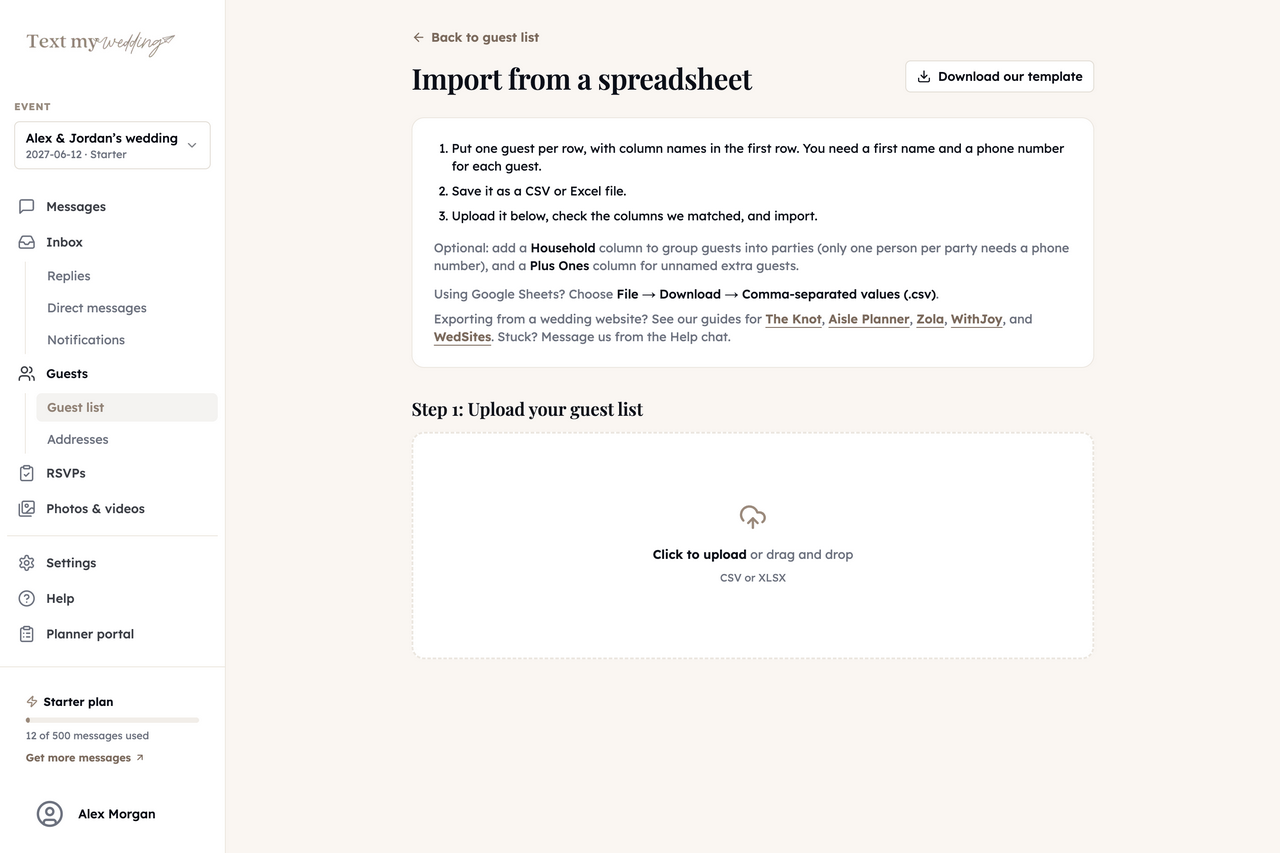
In Text My Wedding, upload the CSV. You can open it in Excel or Google Sheets first if you want to tidy anything.
GuestsImport from spreadsheet
- Step 3
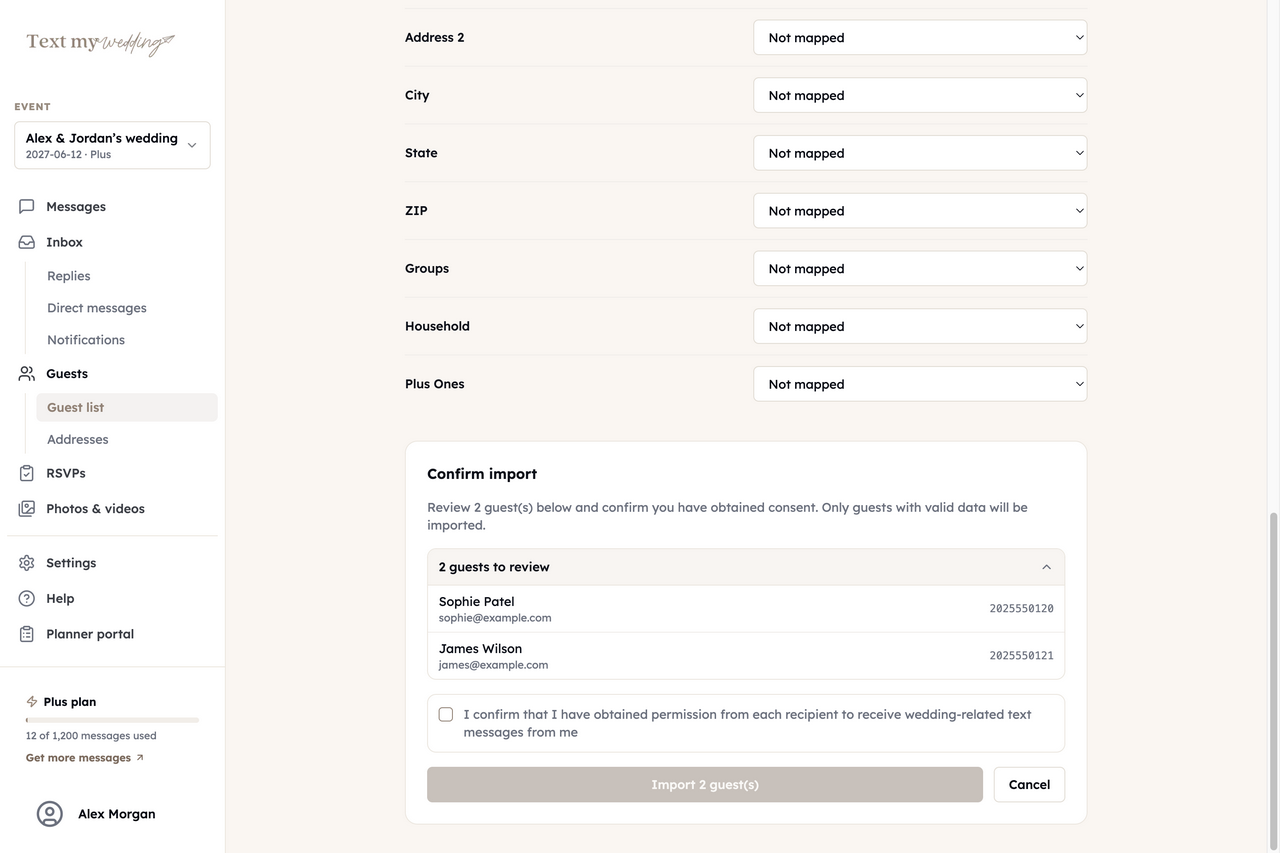
Check the matched columns
Confirm names, phone, email and address, and set Joy's party column as Household. Map Joy tags to Groups only if you want to text them separately.
- Step 4
Send your first text
Text your withjoy.com link, an RSVP link for each household, or an address form to guests Joy has no address for.
Step-by-step instructions are in the Joy import guide.
What comes across from Joy
You choose what each column becomes on the mapping screen. These are the ones worth mapping from Joy's export.
| Joy | Text My Wedding |
|---|---|
| First and last name | Guest name |
| Party | Household, with one shared RSVP link |
| Phone | Phone (US and Canadian mobiles get texts) |
| Mailing address | Household mailing address |
| Tags | Groups, if you map them |
What stays on Joy
- Your withjoy.com page, registry and app
- RSVPs already collected on Joy
- Anything you leave unmapped
What you can do once your guests are in
Everything below runs from Text My Wedding, whichever site your guests RSVP on today.
Text everyone, or one group
Send now or schedule for later, with each guest's name filled in. Links shorten to tmwed.us by default, so you can see who opened yours.
Wedding text messagesCollect RSVPs by household
Each household gets its own RSVP link and answers for everyone in it. Remind only the ones who haven't replied.
RSVP remindersFill in missing addresses
Text each household a private link to a short address form. Answers save straight to your guest list, ready to export.
Address collectionFill in missing phone numbers
Turn on the phone field in your shareable address form. Guests type their name and number, and it saves to the matching guest on your list.
Address form settingsAnswer replies in one inbox
Guest replies land in one inbox that everyone on your event can read, and never go to other guests. Plus and up.
Delivery and repliesCollect everyone's photos
After the wedding, text guests a link to your upload page and get every photo in one album. Starter and up.
Photo sharingJoy Messaging Plus and Text My Wedding
Joy's website is free, and its paid Messaging Plus upgrade adds texting. Here's how that compares, based on Joy's own help center.
Wedding website
- YesJoy
- Keep using it
- NoText My Wedding
- Link to yours in any text
RSVPs
- YesJoy
- On your Joy page
- YesText My Wedding
- One link per household, by text
Text blasts to guests
- PartlyJoy
- With the paid Messaging Plus upgrade
- YesText My Wedding
- Included in every paid plan
RSVP reminders by text
- PartlyJoy
- With Messaging Plus
- YesText My Wedding
- Only households that haven't answered
Scheduled sends
- PartlyJoy
- With Messaging Plus
- YesText My Wedding
- Any message, any date
Guest replies in a shared inbox
- NoJoy
- Not documented
- YesText My Wedding
- Plus and up
Based on Joy’s publicly documented features. Joy is a trademark of its owner. Text My Wedding is independent and is not affiliated with or endorsed by Joy.
Texts to send your Joy guest list
Paste one into a message and swap in your names, dates and link.
Website announcement
Nathan! Our wedding page is live: withjoy.com/amelia-and-julian. The schedule, hotel block and registry are all there.
Hotel reminder
Hi June! Our room block at the Hudson Inn releases July 15. Book under "Hart Reyes" or find the link on our Joy page.
Welcome party
Arriving Friday? Join us for welcome drinks at 7:00 at The Mill on Main St. No RSVP needed, just come say hi.
Morning of
Today's the day! Ceremony at 4:00 at The Willow Barn. Please arrive by 3:40. Parking is in the north lot.
Joy questions couples ask
How do I export my guest list from Joy?
Open your Guest List in Joy and click Export All Guests in the toolbar. Joy downloads a CSV. Upload it in Text My Wedding under Guests → Import from spreadsheet.
Is this an official Joy integration?
No. Text My Wedding works with Joy through the CSV you export. Nothing connects to your Joy account, and your withjoy.com page keeps working as it does now.
Is Text My Wedding an alternative to Joy Messaging Plus?
Yes. Joy's help center says texting, scheduled sends and text RSVP reminders need Messaging Plus. Text My Wedding does all three, gives each household its own RSVP link, and adds a shared inbox for guest replies on Plus and up. You can keep your Joy page either way.
Will my Joy parties carry over?
Yes, if you map Joy's party column to Household. Everyone with the same value lands in one household with a shared RSVP link, and only one person per household needs a phone.
Do my Joy RSVPs come across?
No. Text My Wedding keeps its own RSVP forms. Mark guests who already answered on Joy by hand, or text RSVP links only to the households you're still waiting on.
What if the export combines first and last name?
Map that column to first name on the mapping screen, then split names in the spreadsheet or edit guests afterward so personalized texts read naturally.
Other integrations
Keep your Joy page. Text your guests from here.
Upload your Joy export, check the columns, and preview your first text.
Importing guests and writing messages is free. Plans are one-time purchases from $19 for 50 texts.