
Text My Wedding + Minted
Text your Minted invitation and website to every guest
Minted makes the paper. Text My Wedding reaches the phones. Send a photo of your printed suite or your Minted website link, give each household its own RSVP link, and remind only the guests who haven't answered.
There's no Minted account connection. You upload a photo of your invitation, paste your website link, and bring your guest list as a spreadsheet.

How to text your Minted invitation
- Step 1
Photograph or scan the suite
Shoot the invitation flat, in daylight, and save it as a JPG or PNG. Or skip the photo and text your Minted website link on its own.
- Step 2
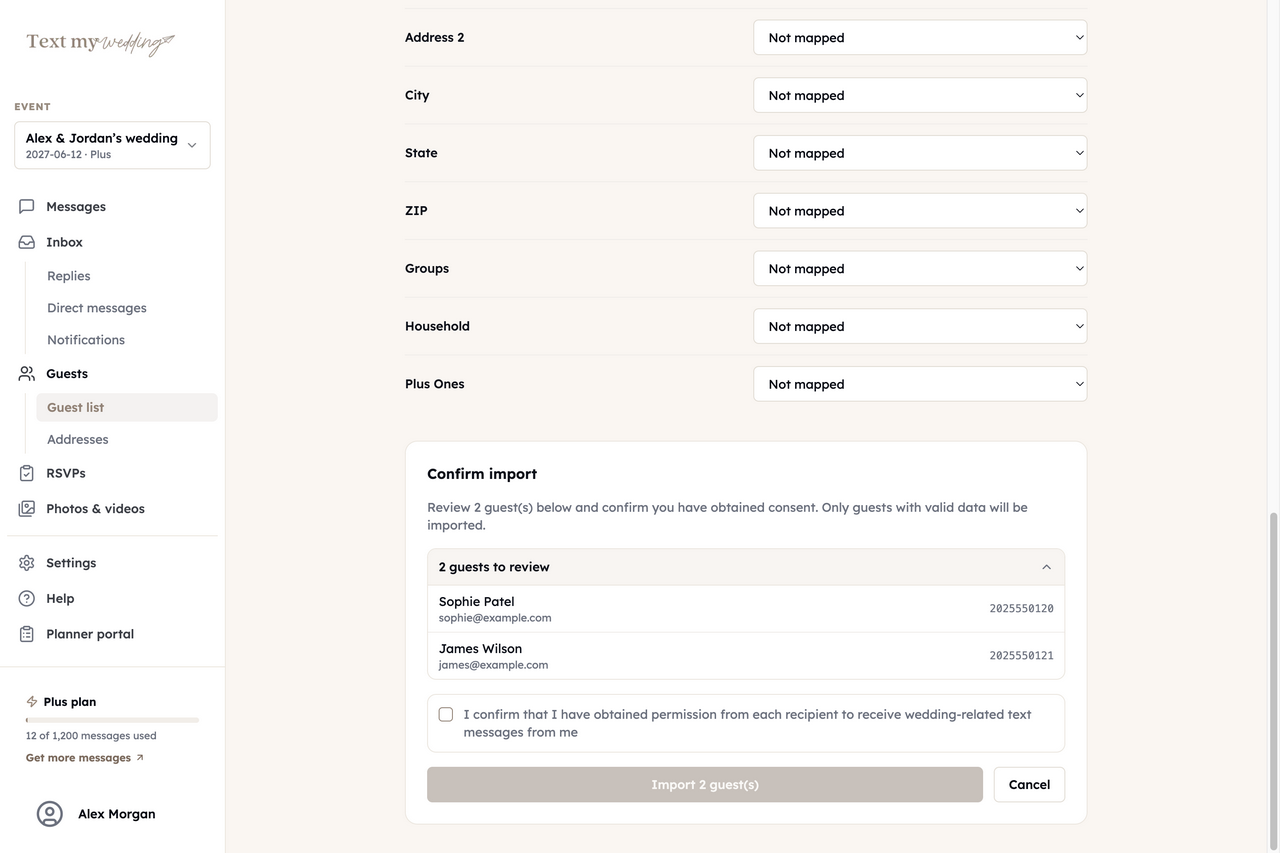
Bring in your guest list
Minted says your wedding website's guest list can be downloaded as a spreadsheet; its Address Book can't. Upload whichever spreadsheet you addressed envelopes from.
GuestsImport from spreadsheet
- Step 3
Add it to an RSVP form
Create a Wedding RSVP form and upload the photo as its invitation image, so every RSVP text carries the picture.
RSVPsWedding RSVP
- Step 4
Text it to guests
Send it a few days after the mail lands, then remind only the households that haven't answered.
Step-by-step instructions are in the guest import guide.
What comes across from Minted
Minted holds the design and your mailing list. This is what each piece becomes in Text My Wedding.
| Minted | Text My Wedding |
|---|---|
| Photo of your printed suite | A picture in the text, and the RSVP page's invitation |
| Minted website link | A tmwed.us link that shows who opened it |
| Guest list spreadsheet | Guests and households, with addresses |
| Name on envelope | Household, so each party imports together |
What stays on Minted
- Your printed stationery and its design files
- Your Minted website and its RSVPs
- Your Minted Address Book
What you can do once your guests are in
Everything below runs from Text My Wedding, whichever site your guests RSVP on today.
Text everyone, or one group
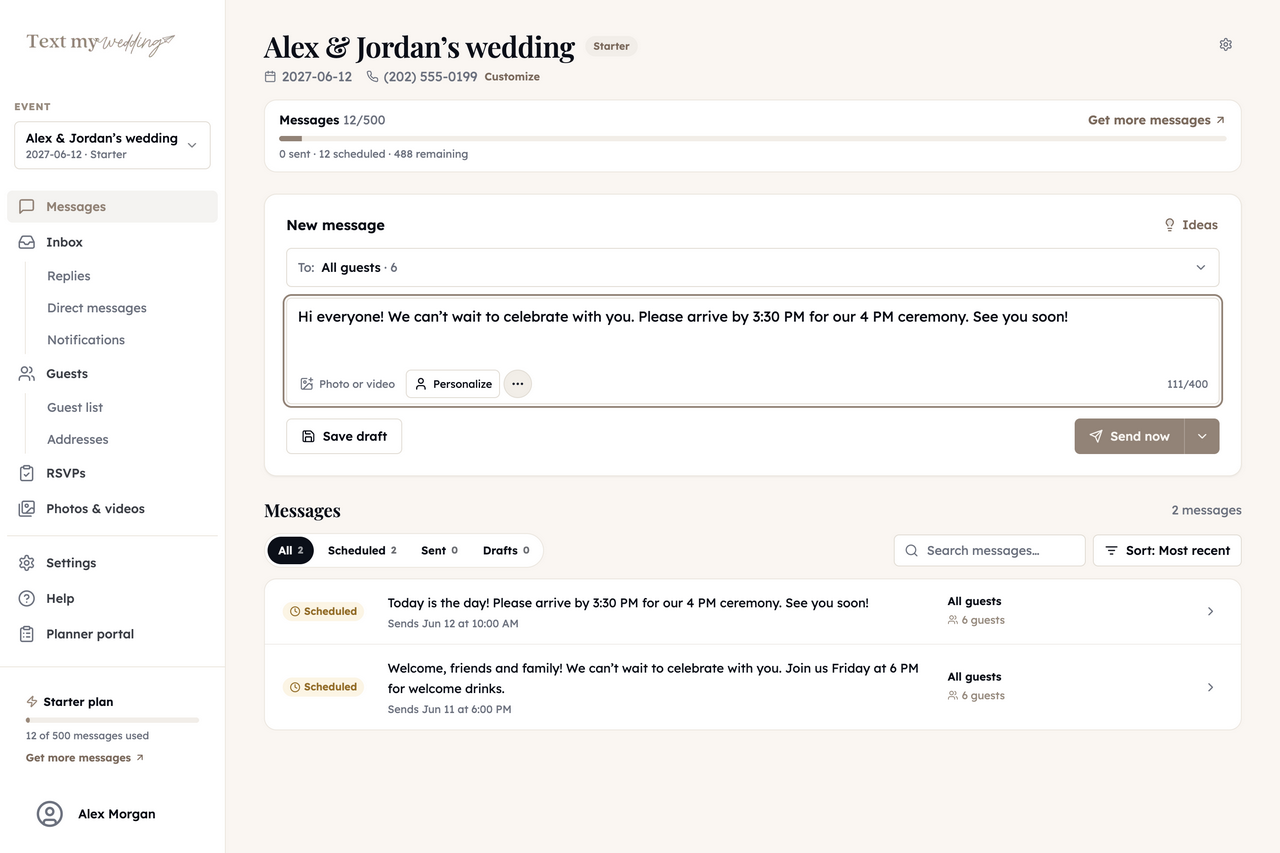
Send now or schedule for later, with each guest's name filled in. Links shorten to tmwed.us by default, so you can see who opened yours.
Wedding text messagesCollect RSVPs by household
Each household gets its own RSVP link and answers for everyone in it. Remind only the ones who haven't replied.
RSVP remindersFill in missing addresses
Text each household a private link to a short address form. Answers save straight to your guest list, ready to export.
Address collectionFill in missing phone numbers
Turn on the phone field in your shareable address form. Guests type their name and number, and it saves to the matching guest on your list.
Address form settingsAnswer replies in one inbox
Guest replies land in one inbox that everyone on your event can read, and never go to other guests. Plus and up.
Delivery and repliesCollect everyone's photos
After the wedding, text guests a link to your upload page and get every photo in one album. Starter and up.
Photo sharingMinted and Text My Wedding, side by side
Minted is where the stationery and website live. Text My Wedding is the follow-through on guests' phones.
Printed invitations and save the dates
- YesMinted
- Keep ordering there
- NoText My Wedding
- Text a photo of yours
Wedding website with RSVPs
- YesMinted
- Keep using it
- PartlyText My Wedding
- RSVP links by text, no website
Text messages to guests
- NoMinted
- Not documented
- YesText My Wedding
- To everyone or a group
Reminders to guests who haven't replied
- NoMinted
- Not documented
- YesText My Wedding
- One tap, only the silent households
Based on Minted’s publicly documented features. Minted is a trademark of its owner. Text My Wedding is independent and is not affiliated with or endorsed by Minted.
Texts to send alongside Minted paper
Paste one into a message and swap in your names, dates and link.
Invitation in the mail
Hi Eleanor! Your invitation is on its way and should arrive this week. Can't wait to celebrate with you.
Lost reply card
If our reply card went missing, no problem. You can RSVP for your whole party at the link below.
Website
Our wedding website has the schedule, hotel block and registry. Everything's there whenever you need it.
Final headcount
We're giving the caterer our final count on Friday. Could you let us know if you'll make it?
Minted questions couples ask
Can I text my Minted invitation to guests?
Yes. Photograph or scan the printed suite, save it as a JPG or PNG, and attach it to a text or add it to an RSVP form as the invitation image.
Can I import my guest list from Minted?
Minted says the guest list on your Minted wedding website can be downloaded as a spreadsheet, and Text My Wedding imports CSV and Excel files. Minted's help center says its Address Book can't be exported, so use the spreadsheet you addressed envelopes from.
Can I send my Minted wedding website by text?
Yes. Paste your Minted website link into any message. By default Text My Wedding shortens it to a tmwed.us link and shows you which guests opened it.
My list has addresses but no phone numbers. What now?
Import it anyway. Map the envelope-name column to Household, and guests without phones still import into their party and count in RSVPs. Then turn on the phone field in your shareable address form so guests can add their own number.
Is this an official Minted integration?
No. Text My Wedding works with photos, links and spreadsheets you bring over. Nothing connects to your Minted account.
Other integrations
Paper for the mailbox. A text for everyone who loses it.
Add your guests, upload a photo of your suite, and preview the text before anything sends.
Importing guests and writing messages is free. Plans are one-time purchases from $19 for 50 texts.