Bulk texts for weddings
Bulk texts, sorted by who actually needs them
Send the hotel block to out-of-town guests, the call time to the wedding party, and the big update to everyone, from one guest list with as many groups as you need. A guest in two groups still gets one text.
- Groups for every audience
- One copy per guest
- Scheduled sends
How it's sent
Make the groups once, reuse them all year
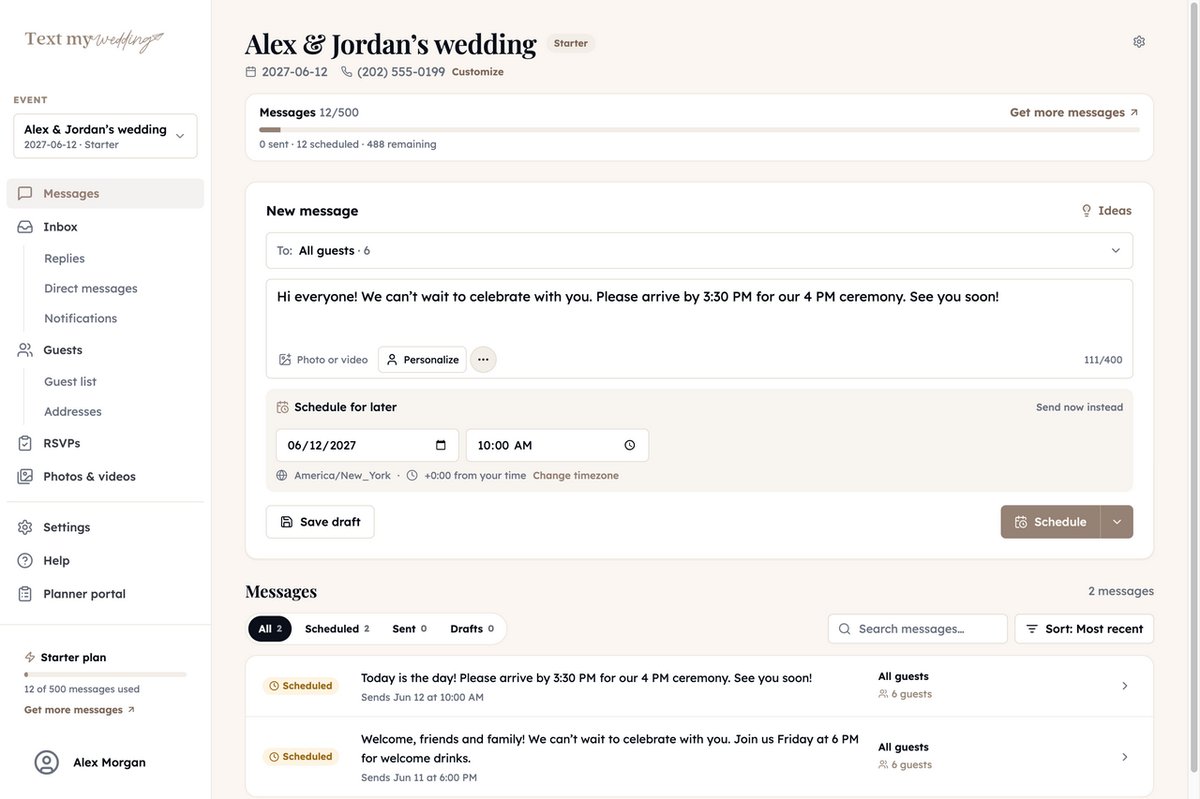
Sort guests into groups from the guest list: Out-of-town, Wedding party, Rehearsal dinner, Family. Every bulk text after that is two taps to the right people, sent now or scheduled.
- 1
Pick who gets it
All guests, or a group you made, like Wedding party or Shuttle riders. Someone in two of the groups you pick still gets one text.
- 2
Write it once
Personalize drops in each guest's first name. Add a photo, a map, or an Attachment Page with the details.
- 3
Send now or schedule it
Pick a date and time in your event's timezone, or send right away. Send it to “Just me” first to see exactly what guests get.
Bulk text wording, group by group
Different groups, different texts, one guest list.
- 1
Out-of-town guests, 2 months out
The hotel block
Hi Priya! Our room block at Hotel Linden closes May 1. Book with the group rate here:tmwed.us/Ht6bR - 2
Wedding party, the week of
The rehearsal call
Hi Priya! Rehearsal is Friday at 5:00 PM at St. Mark's, then dinner at Bella's on Main. Can't wait! - 3
All guests, the day before
The big update
Tomorrow's the day, Priya! Ceremony at 4:00 PM - please arrive by 3:30. See you there!
Bulk sending starts with a clean list. You can import from The Knot, Zola or Joy.
How to organize bulk texts
Good groups make every send after them easy.
- Build groups around what guests need to hear: Out-of-town, Shuttle riders, Wedding party, Rehearsal dinner.
- A guest can be in as many groups as fit. They still get one copy of each text.
- Add guests to a group in bulk from the guest list's selection bar.
- Custom properties like a hotel or table number can go straight into the text with Personalize.
Every text, sent the way guests want it
The same tools behind every message you send from Text My Wedding.
Private, one-to-one texts
Every guest gets their own text. Nobody sees anyone else's number, and there's no group thread to reply all to.
Replies come only to you
When a guest texts back, it goes to your wedding's number, not to 150 other phones. Read and answer replies in the app on Plus and up.
Their name, not “Hi all”
Personalize adds each guest's first name, last name, or household name to the same message.
Groups for every audience
Make groups like Wedding party, Shuttle riders, or Out-of-town guests, and text only the people who need it.
Scheduled ahead
Write messages weeks early and they go out on their own, at the time you picked, in your event's timezone.
Delivery for every guest
See who each message reached and which numbers failed, then fix the number and send to the guests who missed it.
What Our Couples Say
Rachel J.
This service was a lifesaver for me and our guests loved it! We had transportation for our guests an...
Julia S.
We used Text My Wedding for our June 2025 wedding with over 100 out of town guests. It was super eas...
Dani S.
I used this service this weekend for my wedding. It was super easy to set up, no hidden fees, custom...
Carol J.
Did not think we would use the app until our wedding day but 3 weeks prior to our day the venue chan...
Sawyer G.
SO helpful! Our wedding was multiple days in different places and text my wedding was so so amazing....
Send the right text to the right guests
Add your guests, write the message once, and pick when it goes out.
Frequently asked questions
Can a guest be in more than one group?
Yes. If you text two groups they both belong to, they get one copy, and it counts as one message.
Can I see who each bulk text reached?
Yes. Each sent message lists every guest as delivered, undelivered, opted out, or no phone, and Send to more reaches the guests it missed.
Can I put different details in each guest's text?
Yes. Personalize adds first name, last name, household name, or a custom property like a table number or hotel to each guest's copy.
Do guests need to download an app?
No. Guests get a normal text message from your event's number. Links open in their phone's browser, with no account or password.
What do guests see the first time you text them?
Just before your first message, each guest gets a one-time notice that they'll receive texts for your wedding, with HELP and STOP instructions. Your message follows right after.
How much does it cost?
Each text to each guest uses one message from your plan, and replies from guests are free. Plans are one-time purchases starting at $19 for 50 messages, and every account starts free.
More messages couples send
- Send RSVP Reminders
- Send Digital Invites
- Send Save the Dates
- Send Wedding Updates
- Rehearsal Dinner Reminders
- Share Your Wedding Day Schedule
- Guest Transportation Updates
- Post-Wedding Thank Yous
- Share Wedding Photos
- Send Mass Texts
- Send Texts Without Reply All
- Weather Updates
- Accommodation Information
- Destination Wedding Travel Tips
- Post-Wedding Brunch Invitations
- All use cases
Ready to dive in?Remove wedding day stress.
Send and schedule messages to your guests. Collect photos and RSVPs. All in one place.
Sign up now